










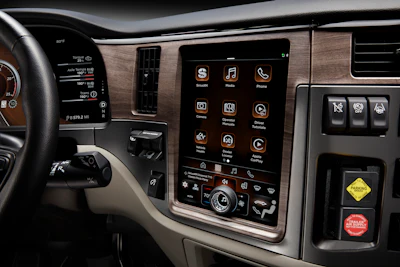
Paccar is rolling out its new Paccar Connect to Kenworth and Peterbilt Class 8 trucks starting in early 2027. The new interface allows touchscreen access to HVAC and audio controls, Apple CarPlay and the truck’s exterior cameras, proprietary Paccar applications as well as third-party integration with some Platform Science native applications.
In Kenworth trucks, the touchscreen driver display is presented in a horizontal screen format. In Peterbilt trucks, the 13-inch driver display is vertically oriented and integrated seamlessly into the dash, replacing a host of physical controls.
 Kenworth's Paccar Connect display
 Peterbilt's Paccar Connect display in vertical orientation
Click the video below to watch an in-depth walkthrough from Chase Wolf, Peterbilt segment marketing manager, on all the features available of the new driver interface.
CCJ got a hands-on demonstration of Paccar Connect during a Peterbilt press event in Sonoma, Calif. The screen layout is well organized with a dynamic display on the top two-thirds of the screen. That area displays notifications such as alerts, album information and phone calls and changes depending on what application the driver is using (Apple CarPlay, Dealer Locator, camera views, Paccar apps, etc.). Those modes are selectable from a static row of touchscreen “buttons” directly below the dynamic display.
The bottom third of the screen is reserved for an array of multifunction controls for audio, HVAC and temperature. The digital display changes functions with the push in the center of a “knob on glass” dial, allowing the driver to cycle through those three functions to get to the desired controls. The knob is then used to control fan speed, temperature range or volume, depending on the mode selected.
Connecting truck and driver
Beyond cab climate and media controls, Paccar Connect’s driver display also provides access to information about the truck through one of four native applications. The Vehicle Health app provides diagnostic and maintenance information, allowing the driver to make real-time decisions on whether an alert requires immediate intervention from a service center or if it is something they can troubleshoot themselves and continue their route.
Using the Digital Operator’s Manual app, drivers can also use the screen to access digital operator manuals, including a keyword search that allows quick access to information right on the screen.
With the Dealer Locator app, drivers can search for dealers along a route or search by distance based on the truck’s current location. The app displays distance from current location, dealer name, address, hours of operation and phone number.
The system also integrates with the vehicle’s cameras, with four digital and four analog inputs available. The cameras can be linked to specific vehicle functions. For instance, the driver can set the system up so that the left- or right-side exterior camera is displayed when the left or right turn signal is activated, providing an added layer of visibility to the vehicle surroundings. Fifth wheel and backup cameras can also be integrated with the display. Drivers also have control over each camera’s display settings, allowing further customization to their preferences.